SD2112 · WEEK 05

Today

01

Images and technology: perception, mediation, photography

02

Machine A: rules, Bense, Nake and computer art

03

Machine B: learned images and text-to-image

04

Agents: coordinating Machine A + Machine B

05

After the break: logo demo, setup and brief

06

Activated: Machine A, Machine B, Machine A+B

07

Compare the routes; develop your reflection

SD2112 · AI IN DESIGN · WEEK 05

01

00 · IMAGES AND TECHNOLOGY

Images and technology.

Perception → mediation → apparatus → photography

SD2112 · AI IN DESIGN · WEEK 05

02

HEIDEGGER · EQUIPMENT AND TECHNOLOGICAL REVEALING

Heidegger: a tool is more than an object.

IN USE IN INSPECTION YOU + TOOL work through it PROJECT attention on the task YOU examine it TOOL attention on the object Ready-to-hand Present-at-hand LATER: ENFRAMING Modern technology reveals the world as resources to order and use.

A way of revealing—not a synonym for photographic framing.

SD2112 · AI IN DESIGN · WEEK 05

03

IHDE · POSTPHENOMENOLOGY AND TECHNOLOGICAL MEDIATION

Ihde: technology mediates our world.

HUMAN TECHNOLOGY WORLD EMBODIMENT (I — TECHNOLOGY) → WORLD Look through the viewfinder at a scene. HERMENEUTIC I → (TECHNOLOGY — WORLD) Read a photograph as a representation. OTHER RELATIONS: ALTERITY / BACKGROUND

Same camera. Different relations—depending on how you use it.

SD2112 · AI IN DESIGN · WEEK 05

04

FLUSSER · PHOTOGRAPHY AND PROGRAMMED POSSIBILITIES

Flusser: the camera is part of an apparatus.

More than a camera.

Optics, settings and formats.

Distribution and conventions.

A field of programmed possibilities.

In the study, a habitual dark centre

echoed in the generated shops.

The outputs exposed a framing habit.

CURATED PHOTOGRAPHS

One study photograph,

from a larger dataset.

FASTGAN SAMPLES

NATIVE 128 PX · THESIS FIG. 5.3

Are you exploring possibilities—or repeating the apparatus’s defaults?

SD2112 · AI IN DESIGN · WEEK 05

05

PHOTOGRAPHY · THE IMAGE IS A CHOICE

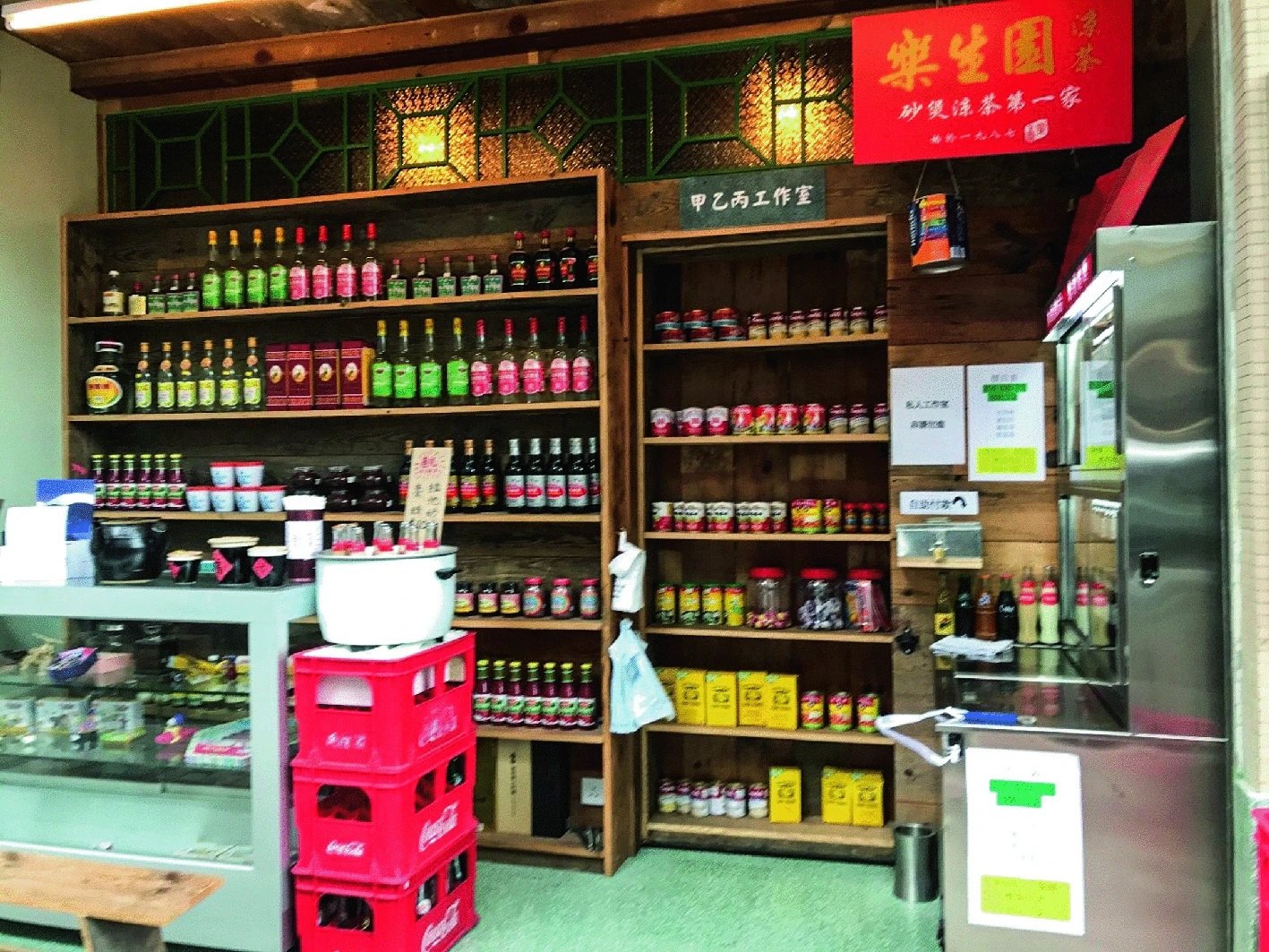
Photography is not a neutral window.

STUDY PHOTOGRAPH · SHAM SHUI PO

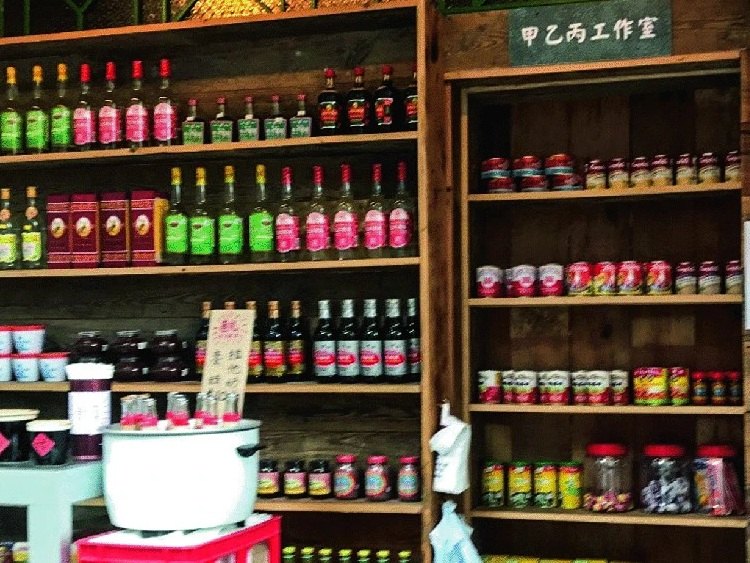
TEACHING CROP · SAME PHOTOGRAPH

What did the frame make you notice—and what disappeared?

SD2112 · AI IN DESIGN · WEEK 05

06

GIO’S COURSE EXTENSION · MACHINE A / MACHINE B / A+B

Same request. Different machines.

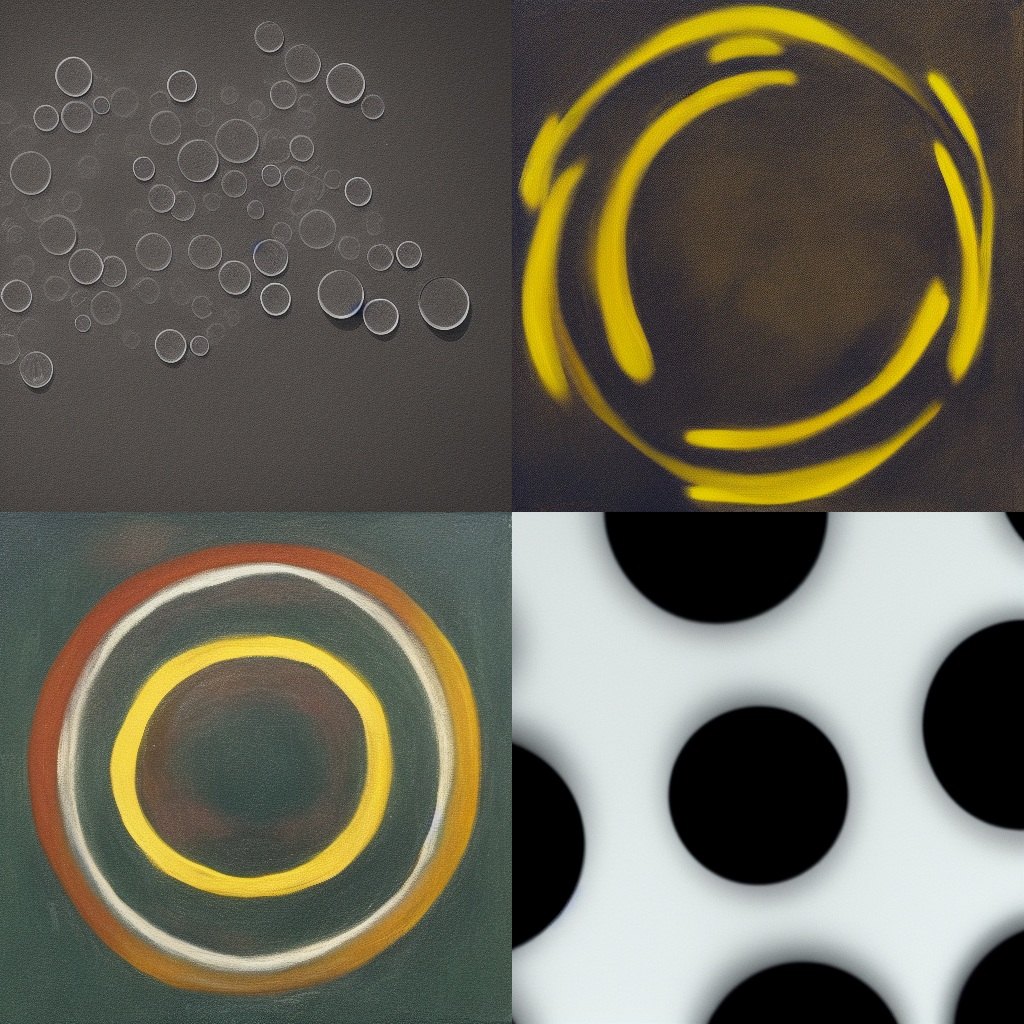
THE REQUEST: “TWO CIRCLES”

MACHINE A · EXPLICIT INSTRUCTIONS

MACHINE B · LEARNED INTERPRETATION

circle(200, 300, 150);

circle(400, 200, 250);

Historical Stable Diffusion samples.

Appearance suggested; count not enforced.

A+B: code sets the boundary; generated pixels supply the surface.

SD2112 · AI IN DESIGN · WEEK 05

07

THE DESIGNER’S JOB · AFTER THE THEORY

The model does not supply your reason for making the image.

INTENT

What should the image do?

Name the subject, audience, feeling, use and visual choices that matter to you.

PROMPT

Make the intent legible.

An agent can ask questions, expose ambiguity and help you write a clearer specification.

JUDGEMENT

Decide what happens next.

You select, critique, revise or reject the result. The model does not own that decision.

SD2112 · AI IN DESIGN · WEEK 05

08

01 · MACHINE A · PROCEDURAL IMAGES

Machine A: images from rules.

Procedures · Bense · Nake · the computer-art debate

SD2112 · AI IN DESIGN · WEEK 05

09

MACHINE A · A SHORT HISTORY

Machine A: design the procedure.

PERSON chooses a rule PROGRAM sets instructions PLOTTER executes the rule IMAGE marks on paper CHANCE CAN BE DESIGNED: variation inside a procedure

The person designs the rules—including where chance may enter.

PERSON → PROGRAM → PLOTTER → IMAGE

SD2112 · AI IN DESIGN · WEEK 05

10

MACHINE A · A SHORT HISTORY

Bense: can aesthetic form be described systematically?

BENSE · INFORMATION + FORM

Describe relations.

A systematic account can ask

how elements are organized.

BIRKHOFF · A DISTINCT PROPOSAL

Order / complexity.

A different mathematical measure;

not Bense’s information theory.

Description can sharpen a question. It does not decide what is beautiful.

Entropy measures uncertainty across possible outcomes.

More unpredictability does not make an image more beautiful.

GENERATIVE AESTHETICS · FROM DESCRIBING FORM TO DEFINING PROCEDURES

SD2112 · AI IN DESIGN · WEEK 05

11

MACHINE A · A SHORT HISTORY

Nake: the artist programs possibilities.

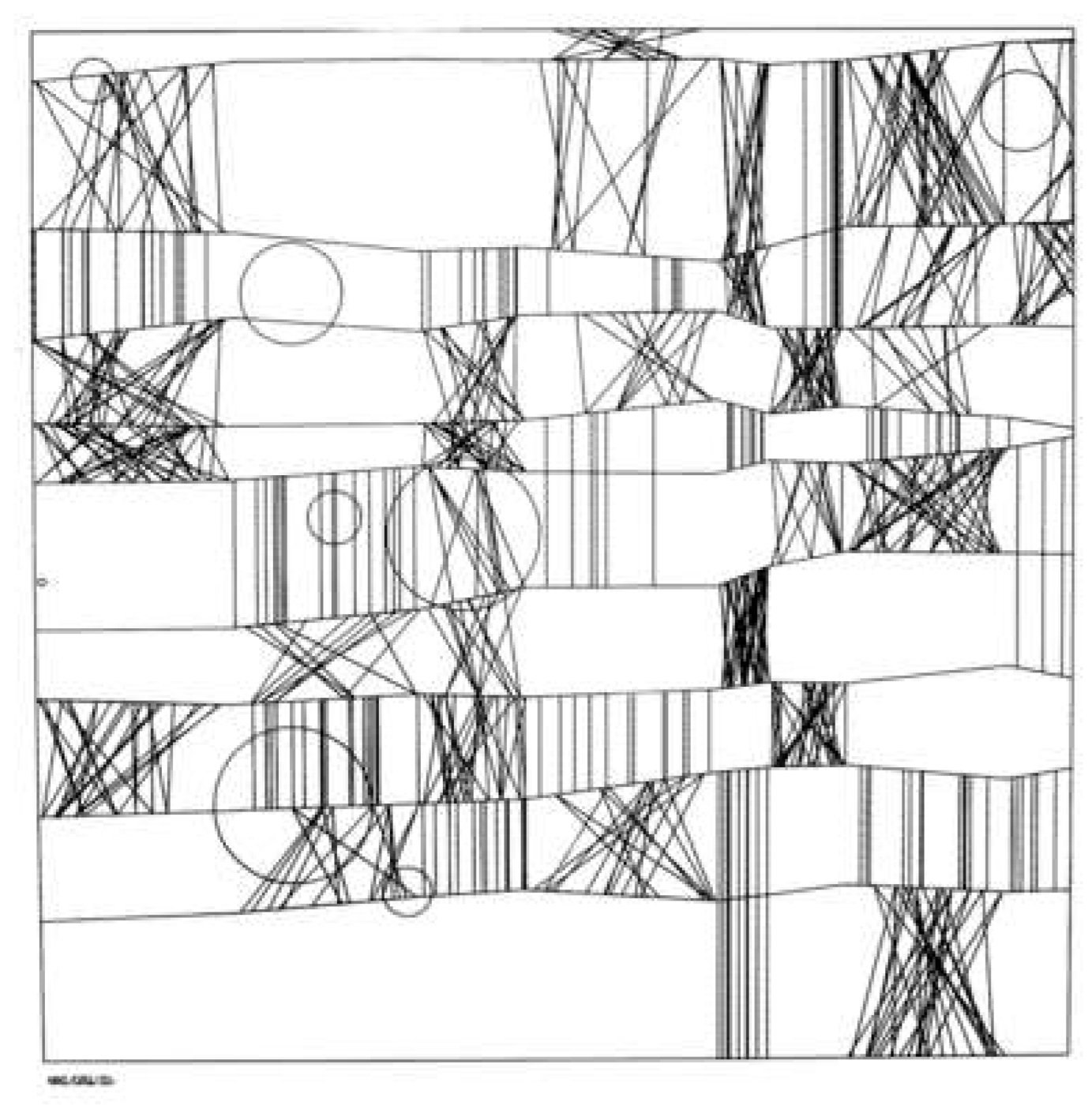
HOMMAGE TO PAUL KLEE · 1965

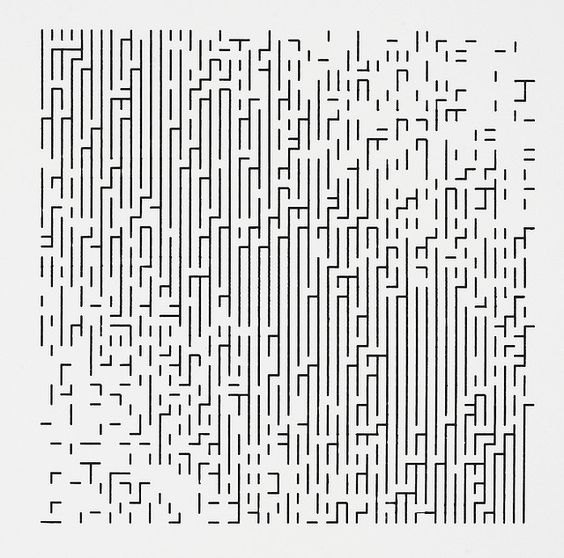
WALK-THROUGH-RASTER · 1966

Designed procedure + variation → an artwork to read and judge.

SD2112 · AI IN DESIGN · WEEK 05

12

MACHINE A · A SHORT HISTORY

A new machine. A familiar argument.

1965 Computer art exhibitions 1968 Cybernetic Serendipity London 1969 New Tendencies · Zagreb EXHIBITION · DEMONSTRATION · PUBLIC DEBATE

The question was not only “Can a machine make this?”

It was also: who makes the choices—and what counts as art?

SD2112 · AI IN DESIGN · WEEK 05

13

MACHINE A · A SHORT HISTORY

There should be no Computer Art.

WHAT HE CHALLENGES

Market + fashion

A label can sell novelty

and hide human decisions.

WHAT HE STILL VALUES

New methods

Computational work can support

production + social communication.

Critique the mystification—not the possibility of making with computers.

FRIEDER NAKE · COMPUTER ARTS SOCIETY · OCTOBER 1971

SD2112 · AI IN DESIGN · WEEK 05

14

02 · MACHINE B · LEARNED IMAGES

Machine B: images from learned patterns.

GANs synthesize · CLIP aligns · diffusion / flow models generate

SD2112 · AI IN DESIGN · WEEK 05

15

GANs · 2014 · GENERATIVE ADVERSARIAL NETWORKS

GANs learn a visual distribution—not a description.

A generator turns random input into candidate images.

A discriminator learns to distinguish generated images from examples.

Classic image GANs: no text prompt telling the model what to draw.

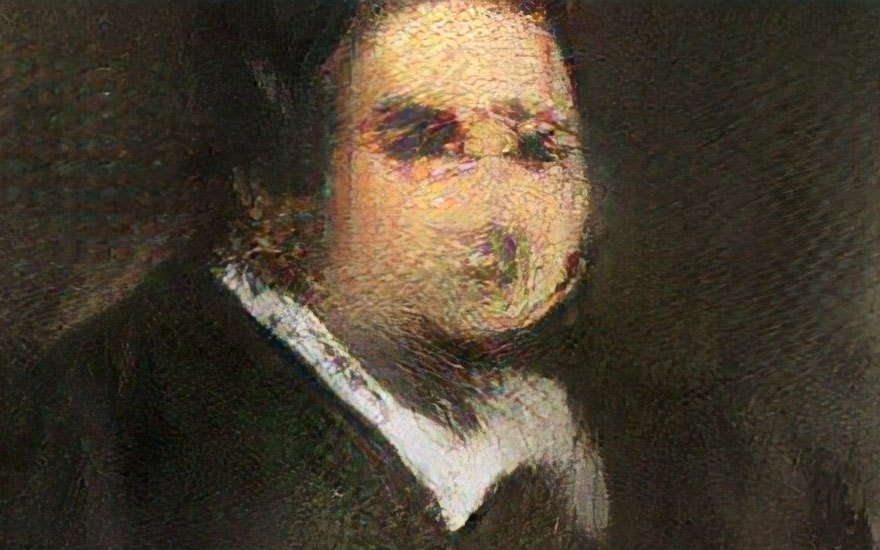
Obvious, Portrait of Edmond de Belamy (2018), made with a GAN; the historical example shown in the 2025 Week 5 deck.

SD2112 · AI IN DESIGN · WEEK 05

16

GANs · TWO MODELS IN COMPETITION

One learns to make. The other learns to catch.

RANDOM INPUT sample noise GENERATOR makes an image CANDIDATE generated image DISCRIMINATOR real or generated? REAL EXAMPLES training images TRAINING SIGNAL Both learn: distinguish examples; make harder-to-distinguish images.

A simplified training picture. Classic image GANs learn from image examples; text is not the instruction channel here.

SD2112 · AI IN DESIGN · WEEK 05

17

CLIP · CONTRASTIVE LANGUAGE–IMAGE PRETRAINING

CLIP brings words and images into a shared space.

CAPTION a chair with curved back TEXT ENCODER caption to vector IMAGE ENCODER picture to vector SHARED EMBEDDING SPACE matching pair different caption mismatched pairs move apart Similarity is not synthesis. A matching vector is not a picture.

Matching pairs move closer; mismatched pairs move apart. CLIP does not generate an image.

SD2112 · AI IN DESIGN · WEEK 05

18

TEXT-TO-IMAGE · A GENERATIVE SYSTEM

A prompt guides an iterative image-generation pipeline.

PROMPT paper lantern in a garden TEXT ENCODER words to features TEXT FEATURES INITIAL LATENT DENOISING MODEL text-conditioned latent updates final z VAE DECODER OUTPUT IMAGE REPEAT

Text is a condition, noise is the starting state, and the decoder returns pixels. Classic latent-diffusion schematic.

SD2112 · AI IN DESIGN · WEEK 05

19

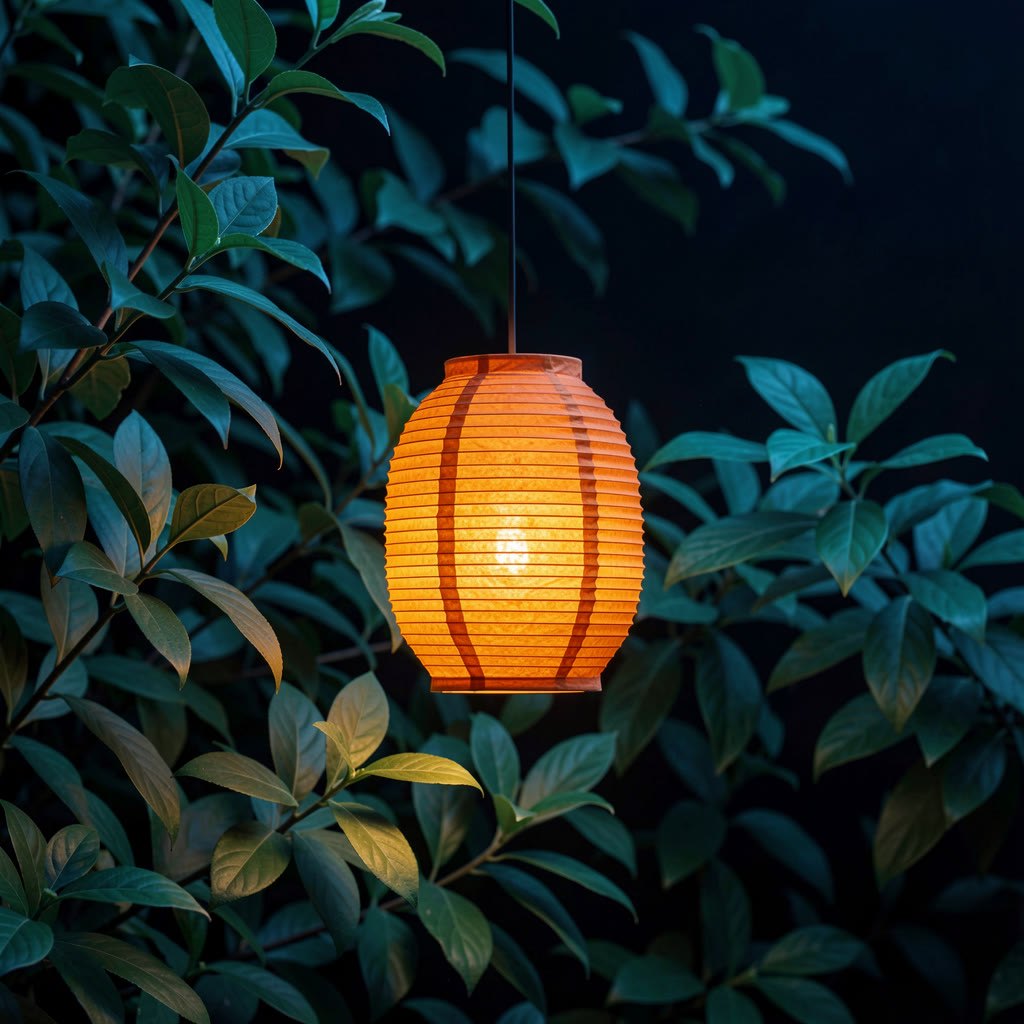
GENERATED EXAMPLE · EASEL / FLUX2-9B

The model gives you a candidate—not a decision.

INTENT

One paper lantern

in a night garden.

OBSERVATION

Dense leaves. Warm light.

A very particular lantern shape.

DECISION

Which choices serve the intent?

Which would you change?

COURSE-GENERATED STILL · 28 SEP 2026

SD2112 · AI IN DESIGN · WEEK 05

20

LATENT DIFFUSION · VARIATIONAL AUTOENCODER

A VAE moves between pixels and a compact latent.

INPUT IMAGE x ENCODER q(z|x) DISTRIBUTION mean + log variance SAMPLE z DECODER p(x|z) RECONSTRUCTION x-hat Reconstruction is approximate. Compact data is not a smaller photograph.

This image-to-image reconstruction illustrates VAE training; generation begins from latent noise.

SD2112 · AI IN DESIGN · WEEK 05

21

CLASSIC LATENT DIFFUSION · TRAINING

Training teaches a denoiser to remove noise.

PREPARE A TRAINING PAIR EXAMPLE IMAGE VAE ENCODER CLEAN LATENT z0 ADD NOISE save the target NOISY LATENT zt DENOISER latent + noise level PREDICT NOISE model output COMPARE prediction vs target UPDATE WEIGHTS reduce prediction error KNOWN NOISE Repeat across many images and noise levels. Text conditioning omitted here.

Compare predicted noise with known added noise; use that error to update the denoiser, not the latent.

SD2112 · AI IN DESIGN · WEEK 05

22

CLASSIC LATENT DIFFUSION · GENERATION

Generation turns new noise into an image.

TEXT FEATURES NEW NOISY LATENT DENOISER learned prediction FINAL LATENT VAE DECODER OUTPUT IMAGE REPEAT LATENT UPDATE Decode after the last update.

The loop changes the latent, not the trained weights. Decode the final latent after the last update.

SD2112 · AI IN DESIGN · WEEK 05

23

TODAY’S MODELS · SAME MAP, DIFFERENT TRAINING

The diagram is a map—not every model’s blueprint.

CLASSIC DIFFUSION

Predict the noise.

Learn from known added noise

at different noise levels.

FLOW MATCHING

Learn a direction.

Learn a direction along a path

from noise towards data.

Text condition → latent updates → decoding

Flux and Qwen Image use flow matching. Check the model—not just the app name.

SD2112 · AI IN DESIGN · WEEK 05

24

REFLECTION SEED 1 · INTENT AND APPEARANCE

When would a convincing image still fail your intention?

Name a convincing result you would reject. What in your brief would it fail?

SD2112 · AI IN DESIGN · WEEK 05

25

Short answer

MACHINE A+B · AGENTS COORDINATE TOOLS

The agent can look, make, and look again.

YOUR INTENT approve the next step AGENT plan / call / observe VISION TOOL inspect an output MEDIA TOOL generate / edit CANDIDATE OBSERVATION YOU KEEP / REVISE / REJECT

The student supplies the intent and decides whether the result is worth keeping.

SD2112 · AI IN DESIGN · WEEK 05

26

FROM WEEK 2 + WEEK 4 · NAME THE MACHINES

Same intent. Different kinds of control.

MACHINE A

Rules execute.

Code sets the shapes, layout and parameters. Change a rule; inspect its effect.

MACHINE B

Learned patterns propose.

An image model interprets the brief. You judge its appearance and assumptions.

A + B

Divide the decisions.

Keep geometry in code; use generated pixels for material, texture or atmosphere.

SD2112 · AI IN DESIGN · WEEK 05

27

BREAK

After the break: make it yours.

Logo demo → install Easel → set one brief → make A, B and A+B

SD2112 · AI IN DESIGN · WEEK 05

28

POLYU SCHOOL OF DESIGN · SD2112 · WEEK 05 · DEMO + WORKSHOP

Images, intentions, iterations.

You bring the idea. The model brings possibilities.

AFTER THE BREAK · EASEL CLIENT · LOGO DEMO

One mark. Three routes.

A

Code the form.

HTML / SVG / Canvas: shapes and parameters.

B

Generate an interpretation.

An image model proposes appearance and material.

A+B

Combine the two.

Generated pixels inside a coded shape or surface.

Easel Client connects the tools. You set the brief and judge what returns.

SD2112 · AI IN DESIGN · WEEK 05

30

IMAGE GENERATION · A COURSE EXAMPLE

What changed when we remade our course mark?

SOURCE MARK · THE SHAPE TO KEEP

EXPLORATION · MATERIAL + SETTING

SD2112 · AI IN DESIGN · WEEK 05

31

CASE DISCUSSION · OUR CHAT + VIDEO ITERATIONS

What stayed wrong after a better prompt?

BRIEF

What must survive?

The mark, the ordered transformations, the final reveal.

EVIDENCE

What actually changed?

Motion, continuity, shape—and the constraints we lost.

NEXT MOVE

Prompt, reference, or workflow?

Choose the intervention that addresses the visible failure.

Watch the versions. Do not confuse a confident explanation with a better result.

SD2112 · AI IN DESIGN · WEEK 05

32

CASE REFLECTION · SD2112 CO-CREATION

The brief emerged through choices.

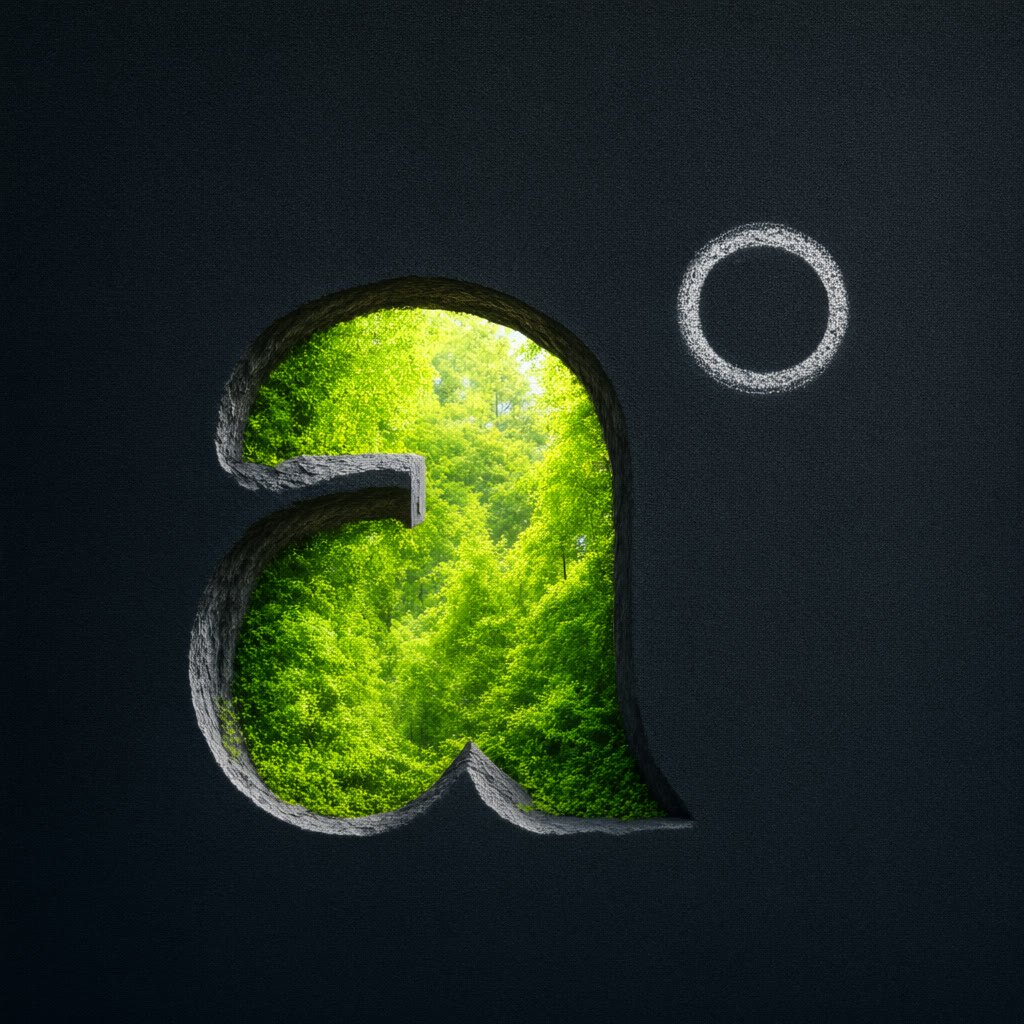
01 · CLEAN MARK

02 · FOREST VARIANT

03 · BRIGHTER EDIT

→

→

A recognizable form to keep.

A setting and material enter.

A chosen refinement—not a finish.

The mark did not arrive fully formed. What entered the brief after seeing a candidate?

SD2112 · AI IN DESIGN · WEEK 05

33

CASE REFLECTION · SD2112 CO-CREATION

A better prompt was not always the right repair.

When the failure is in the transition, change the transition.

EARLIER ITERATIONS

Rejected montage.

Coherent origami repair.

Later, a burn to refine.

→

V8 · OBSERVED MISS

Flames inside the counter

and along the front edge.

→

V9 · TARGETED CHANGE

Replace only that transition:

front-facing, top → bottom.

Prompt repair? Reference repair? Workflow repair? Choose from the failure you can point to.

V9 delivered · review pending · not a claim of final acceptance

What did you delegate—and what did you insist on keeping?

SD2112 · AI IN DESIGN · WEEK 05

34

CASE REFLECTION · SD2112 CO-CREATION

What did the agent actually contribute?

HUMAN

Intent · critique

approval / rejection

→

AGENT · MACHINE B

Tool calls

Versioned brief

→

MEDIA MODELS

Propose images

and motion

→

CODE · MACHINE A

Assembly · audio

frame preservation

→

HUMAN · JUDGES

What actually

works?

A chain of proposals and decisions—not one autonomous author.

V9 was delivered for review. Its final acceptance was not established.

SD2112 · AI IN DESIGN · WEEK 05

35

AFTER THE BREAK · EASEL SETUP

Install. Open. Check.

Download Easel Studio for your OS.

Open Easel Studio. Create one project for your personal mark.

Use the course-approved configuration; test a canvas and one image call.

If setup fails: PolyU GenAI for images; Open Design or your working harness.

Keep the same brief. Pair or use the prepared fallback if needed.

SD2112 · AI IN DESIGN · WEEK 05

36

THE SHARED BRIEF · BEFORE THE TIMER

Make a mark that represents you.

Choose a name, nickname, invented character or personal symbol.

Write one sentence: what should this identity communicate?

Choose two things that must remain recognizable across all three routes.

Keep the same brief. A fictional identity is fine; no portrait is required.

SD2112 · AI IN DESIGN · WEEK 05

37

REFLECTION SEED 2 · YOUR SHARED BRIEF

What should your mark never lose—even when a model reinterprets it?

Name a feature and why it matters to your intent—not only how it looks.

SD2112 · AI IN DESIGN · WEEK 05

38

Short answer

ACTIVITY · WORKSHOP · ONE BRIEF · THREE QUICK STUDIES

40 min

One identity. Three ways of making it.

A · 10 min: code a mark; change one parameter.

B · 10 min: generate an interpretation; inspect one model choice.

A+B · 15 min: combine generated pixels with the coded form.

Compare · 5 min: review your iterations; upload the final A+B image.

SAME IDENTITY

One sentence of intent.

Two recognizable features.

THREE ROUTES

A: rules

B: learned images

A+B: rules + generated pixels

One final image submission.

SD2112 · AI IN DESIGN · WEEK 05

39

ACTIVITY · A · MACHINE A · RULES MAKE THE PICTURE

10 min

Code the mark.

Ask the agent for a simple SVG or Canvas mark from your shared brief.

Expose two parameters: spacing, stroke width, scale or colour.

Change one value. Check what changes and what stays fixed.

Save the code and one view of the mark.

ASK THE CODING AGENT

Use my shared identity brief.

Make HTML with SVG or Canvas.

No image-generation call here.

Expose two simple controls.

Preserve my two key features.

Machine B writes the code;

Machine A executes it.

SD2112 · AI IN DESIGN · WEEK 05

40

ACTIVITY · B · MACHINE B · PATTERNS PROPOSE THE PICTURE

10 min

Generate an interpretation.

Ask the agent to generate images from the same identity brief.

Explore one material, texture or atmosphere; keep one candidate.

Identify one visible choice the model added or changed.

Save the image, prompt and model name if available.

ASK THE AGENT

Use my shared identity brief.

Call the image-generation tool.

Keep the two key features.

Explore material and atmosphere.

Do not depend on exact lettering.

Save the returned image asset.

Keep it for A+B.

SD2112 · AI IN DESIGN · WEEK 05

41

ACTIVITY · A+B · MACHINE A + MACHINE B

15 min

Keep the form. Borrow the surface.

Give the agent your A code and saved B assets as image inputs.

Clip the image, or a cropped region, inside your coded silhouette.

Refine your final version: code controls form; pixels supply the surface.

Three.js is optional: use a texture on a coded surface or mark.

ASK THE CODING AGENT

Keep my A silhouette and controls.

Use the saved B image as a texture.

Use SVG clipping or Canvas masking.

Let me change crop, scale or offset.

Reuse the asset; do not regenerate.

Optional: bundled Three.js kit.

No external CDN imports.

SD2112 · AI IN DESIGN · WEEK 05

42

COMPARE · 5 MIN · FINAL IMAGE SUBMISSION

Upload your final A+B image.

One image of your third exercise: export the result or take a screenshot.

Submit the final version, not a comparison sheet of all three.

SD2112 · AI IN DESIGN · WEEK 05

43

Image upload

OPTIONAL EXTRA · VIDEO SUBMISSION

Optional: animate your final version.

Ask the Easel agent to animate your final version.

Record the animated canvas, or use video generation if available.

Upload a playable clip in the optional video activity, or skip this.

Your final image completes the workshop.

SD2112 · AI IN DESIGN · WEEK 05

44

CHALLENGE 4 · BRING TO WEEK 6

Three routes. One comparison layout.

YOUR IDENTITY

Keep the shared brief.

One sentence of intent, two recognizable features, and the A / B / A+B views.

YOUR PROCESS

Keep the evidence.

Code, image prompt, model/tool details and one deliberate change with its effect.

YOUR JUDGEMENT

Explain the trade-off.

What did rules enforce? What did the model invent? Was the hybrid worth it?

SD2112 · AI IN DESIGN · WEEK 05

45

KEEP A PROCESS RECORD · WEEK 7 REFLECTION

Turn a result into an argument.

Return to a ClassPoint question: make a claim about your creative process.

Support it with a decision and evidence: images, code, prompts or revisions.

Compare A and B. What did each make possible, difficult or likely?

About 1000 words; three of your own experiments with images; an AI-writing process note.

SD2112 · AI IN DESIGN · WEEK 05

46

Rules. Patterns. Your decisions.

You chose what each machine could decide—and what it could not.

venetanji.github.io/sd2112-teaching · www.youtube.com/playlist?list=PLU58DFEI5YDQ

a·t4x

SD2112 · AI in Design · Week 05
1

SD2112 · WEEK 05

Today

01 Images and technology: perception, mediation, photography

02 Machine A: rules, Bense, Nake and computer art

03 Machine B: learned images and text-to-image

04 Agents: coordinating Machine A + Machine B

05 After the break: logo demo, setup and brief

06 Activated: Machine A, Machine B, Machine A+B

07 Compare the routes; develop your reflection

2

00 · IMAGES AND TECHNOLOGY

Images and technology.

PERCEPTION → MEDIATION → APPARATUS → PHOTOGRAPHY

3

HEIDEGGER · EQUIPMENT AND TECHNOLOGICAL REVEALING

Heidegger: a tool is more than an object.

IN USE IN INSPECTION YOU + TOOL work through it PROJECT attention on the task YOU examine it TOOL attention on the object Ready-to-hand Present-at-hand LATER: ENFRAMING Modern technology reveals the world as resources to order and use.

A way of revealing—not a synonym for photographic framing.

4

IHDE · POSTPHENOMENOLOGY AND TECHNOLOGICAL MEDIATION

Ihde: technology mediates our world.

HUMAN TECHNOLOGY WORLD EMBODIMENT (I — TECHNOLOGY) → WORLD Look through the viewfinder at a scene. HERMENEUTIC I → (TECHNOLOGY — WORLD) Read a photograph as a representation. OTHER RELATIONS: ALTERITY / BACKGROUND

Same camera. Different relations—depending on how you use it.

5

FLUSSER · PHOTOGRAPHY AND PROGRAMMED POSSIBILITIES

Flusser: the camera is part of an apparatus.

More than a camera.

Optics, settings and formats.

Distribution and conventions.

A field of programmed possibilities.

In the study, a habitual dark centre

echoed in the generated shops.

The outputs exposed a framing habit.

CURATED PHOTOGRAPHS

One study photograph,

from a larger dataset.

FASTGAN SAMPLES

NATIVE 128 PX · THESIS FIG. 5.3

Are you exploring possibilities—or repeating the apparatus’s defaults?

6

PHOTOGRAPHY · THE IMAGE IS A CHOICE

Photography is not a neutral window.

STUDY PHOTOGRAPH · SHAM SHUI PO

TEACHING CROP · SAME PHOTOGRAPH

What did the frame make you notice—and what disappeared?

7

GIO’S COURSE EXTENSION · MACHINE A / MACHINE B / A+B

Same request. Different machines.

THE REQUEST: “TWO CIRCLES”

MACHINE A · EXPLICIT INSTRUCTIONS

MACHINE B · LEARNED INTERPRETATION

circle(200, 300, 150);

circle(400, 200, 250);

Historical Stable Diffusion samples.

Appearance suggested; count not enforced.

A+B: code sets the boundary; generated pixels supply the surface.

8

THE DESIGNER’S JOB · AFTER THE THEORY

The model does not supply your reason for making the image.

INTENT

What should the image do?

Name the subject, audience, feeling, use and visual choices that matter to you.

PROMPT

Make the intent legible.

An agent can ask questions, expose ambiguity and help you write a clearer specification.

JUDGEMENT

Decide what happens next.

You select, critique, revise or reject the result. The model does not own that decision.

9

01 · MACHINE A · PROCEDURAL IMAGES

Machine A: images from rules.

PROCEDURES · BENSE · NAKE · THE COMPUTER-ART DEBATE

10

MACHINE A · A SHORT HISTORY

Machine A: design the procedure.

PERSON chooses a rule PROGRAM sets instructions PLOTTER executes the rule IMAGE marks on paper CHANCE CAN BE DESIGNED: variation inside a procedure

The person designs the rules—including where chance may enter.

PERSON → PROGRAM → PLOTTER → IMAGE

11

MACHINE A · A SHORT HISTORY

Bense: can aesthetic form be described systematically?

BENSE · INFORMATION + FORM

Describe relations.

A systematic account can ask

how elements are organized.

BIRKHOFF · A DISTINCT PROPOSAL

Order / complexity.

A different mathematical measure;

not Bense’s information theory.

Description can sharpen a question. It does not decide what is beautiful.

Entropy measures uncertainty across possible outcomes.

More unpredictability does not make an image more beautiful.

GENERATIVE AESTHETICS · FROM DESCRIBING FORM TO DEFINING PROCEDURES

12

MACHINE A · A SHORT HISTORY

Nake: the artist programs possibilities.

HOMMAGE TO PAUL KLEE · 1965

WALK-THROUGH-RASTER · 1966

Designed procedure + variation → an artwork to read and judge.

13

MACHINE A · A SHORT HISTORY

A new machine. A familiar argument.

1965 Computer art exhibitions 1968 Cybernetic Serendipity London 1969 New Tendencies · Zagreb EXHIBITION · DEMONSTRATION · PUBLIC DEBATE

The question was not only “Can a machine make this?”

It was also: who makes the choices—and what counts as art?

14

MACHINE A · A SHORT HISTORY

There should be no Computer Art.

WHAT HE CHALLENGES

Market + fashion

A label can sell novelty

and hide human decisions.

WHAT HE STILL VALUES

New methods

Computational work can support

production + social communication.

Critique the mystification—not the possibility of making with computers.

FRIEDER NAKE · COMPUTER ARTS SOCIETY · OCTOBER 1971

Read the original: There should be no Computer Art

15

02 · MACHINE B · LEARNED IMAGES

Machine B: images from learned patterns.

GANS SYNTHESIZE · CLIP ALIGNS · DIFFUSION / FLOW MODELS GENERATE

16

GANS · 2014 · GENERATIVE ADVERSARIAL NETWORKS

GANs learn a visual distribution—not a description.

A generator turns random input into candidate images.

A discriminator learns to distinguish generated images from examples.

Classic image GANs: no text prompt telling the model what to draw.

Obvious, Portrait of Edmond de Belamy (2018), made with a GAN; the historical example shown in the 2025 Week 5 deck.

17

GANS · TWO MODELS IN COMPETITION

One learns to make. The other learns to catch.

RANDOM INPUT sample noise GENERATOR makes an image CANDIDATE generated image DISCRIMINATOR real or generated? REAL EXAMPLES training images TRAINING SIGNAL Both learn: distinguish examples; make harder-to-distinguish images.

A simplified training picture. Classic image GANs learn from image examples; text is not the instruction channel here.

18

CLIP · CONTRASTIVE LANGUAGE–IMAGE PRETRAINING

CLIP brings words and images into a shared space.

CAPTION a chair with curved back TEXT ENCODER caption to vector IMAGE ENCODER picture to vector SHARED EMBEDDING SPACE matching pair different caption mismatched pairs move apart Similarity is not synthesis. A matching vector is not a picture.

Matching pairs move closer; mismatched pairs move apart. CLIP does not generate an image.

19

TEXT-TO-IMAGE · A GENERATIVE SYSTEM

A prompt guides an iterative image-generation pipeline.

PROMPT paper lantern in a garden TEXT ENCODER words to features TEXT FEATURES INITIAL LATENT DENOISING MODEL text-conditioned latent updates final z VAE DECODER OUTPUT IMAGE REPEAT

Text is a condition, noise is the starting state, and the decoder returns pixels. Classic latent-diffusion schematic.

20

GENERATED EXAMPLE · EASEL / FLUX2-9B

The model gives you a candidate—not a decision.

INTENT

One paper lantern

in a night garden.

OBSERVATION

Dense leaves. Warm light.

A very particular lantern shape.

DECISION

Which choices serve the intent?

Which would you change?

COURSE-GENERATED STILL · 28 SEP 2026

21

LATENT DIFFUSION · VARIATIONAL AUTOENCODER

A VAE moves between pixels and a compact latent.

INPUT IMAGE x ENCODER q(z|x) DISTRIBUTION mean + log variance SAMPLE z DECODER p(x|z) RECONSTRUCTION x-hat Reconstruction is approximate. Compact data is not a smaller photograph.

This image-to-image reconstruction illustrates VAE training; generation begins from latent noise.

22

CLASSIC LATENT DIFFUSION · TRAINING

Training teaches a denoiser to remove noise.

PREPARE A TRAINING PAIR EXAMPLE IMAGE VAE ENCODER CLEAN LATENT z0 ADD NOISE save the target NOISY LATENT zt DENOISER latent + noise level PREDICT NOISE model output COMPARE prediction vs target UPDATE WEIGHTS reduce prediction error KNOWN NOISE Repeat across many images and noise levels. Text conditioning omitted here.

Compare predicted noise with known added noise; use that error to update the denoiser, not the latent.

23

CLASSIC LATENT DIFFUSION · GENERATION

Generation turns new noise into an image.

TEXT FEATURES NEW NOISY LATENT DENOISER learned prediction FINAL LATENT VAE DECODER OUTPUT IMAGE REPEAT LATENT UPDATE Decode after the last update.

The loop changes the latent, not the trained weights. Decode the final latent after the last update.

24

TODAY’S MODELS · SAME MAP, DIFFERENT TRAINING

The diagram is a map—not every model’s blueprint.

CLASSIC DIFFUSION

Predict the noise.

Learn from known added noise

at different noise levels.

FLOW MATCHING

Learn a direction.

Learn a direction along a path

from noise towards data.

Text condition → latent updates → decoding

Flux and Qwen Image use flow matching. Check the model—not just the app name.

25

REFLECTION SEED 1 · INTENT AND APPEARANCE

When would a convincing image still fail your intention?

Name a convincing result you would reject. What in your brief would it fail?

ClassPoint · short answer — answer on the projector

26

MACHINE A+B · AGENTS COORDINATE TOOLS

The agent can look, make, and look again.

YOUR INTENT approve the next step AGENT plan / call / observe VISION TOOL inspect an output MEDIA TOOL generate / edit CANDIDATE OBSERVATION YOU KEEP / REVISE / REJECT

The student supplies the intent and decides whether the result is worth keeping.

27

FROM WEEK 2 + WEEK 4 · NAME THE MACHINES

Same intent. Different kinds of control.

MACHINE A

Rules execute.

Code sets the shapes, layout and parameters. Change a rule; inspect its effect.

MACHINE B

Learned patterns propose.

An image model interprets the brief. You judge its appearance and assumptions.

A + B

Divide the decisions.

Keep geometry in code; use generated pixels for material, texture or atmosphere.

28

BREAK

After the break: make it yours.

LOGO DEMO → INSTALL EASEL → SET ONE BRIEF → MAKE A, B AND A+B

29

POLYU SCHOOL OF DESIGN · SD2112 · WEEK 05 · DEMO + WORKSHOP

Images, intentions, iterations.

You bring the idea. The model brings possibilities.

30

AFTER THE BREAK · EASEL CLIENT · LOGO DEMO

One mark. Three routes.

A

Code the form.

HTML / SVG / Canvas: shapes and parameters.

B

Generate an interpretation.

An image model proposes appearance and material.

A+B

Combine the two.

Generated pixels inside a coded shape or surface.

Easel Client connects the tools. You set the brief and judge what returns.

31

IMAGE GENERATION · A COURSE EXAMPLE

What changed when we remade our course mark?

SOURCE MARK · THE SHAPE TO KEEP

EXPLORATION · MATERIAL + SETTING

32

CASE DISCUSSION · OUR CHAT + VIDEO ITERATIONS

What stayed wrong after a better prompt?

BRIEF

What must survive?

The mark, the ordered transformations, the final reveal.

EVIDENCE

What actually changed?

Motion, continuity, shape—and the constraints we lost.

NEXT MOVE

Prompt, reference, or workflow?

Choose the intervention that addresses the visible failure.

Watch the versions. Do not confuse a confident explanation with a better result.

33

CASE REFLECTION · SD2112 CO-CREATION

The brief emerged through choices.

01 · CLEAN MARK

02 · FOREST VARIANT

03 · BRIGHTER EDIT

→

→

A recognizable form to keep.

A setting and material enter.

A chosen refinement—not a finish.

The mark did not arrive fully formed. What entered the brief after seeing a candidate?

34

CASE REFLECTION · SD2112 CO-CREATION

A better prompt was not always the right repair.

When the failure is in the transition, change the transition.

EARLIER ITERATIONS

Rejected montage.

Coherent origami repair.

Later, a burn to refine.

→

V8 · OBSERVED MISS

Flames inside the counter

and along the front edge.

→

V9 · TARGETED CHANGE

Replace only that transition:

front-facing, top → bottom.

Prompt repair? Reference repair? Workflow repair? Choose from the failure you can point to.

V9 delivered · review pending · not a claim of final acceptance

What did you delegate—and what did you insist on keeping?

35

CASE REFLECTION · SD2112 CO-CREATION

What did the agent actually contribute?

HUMAN

Intent · critique

approval / rejection

→

AGENT · MACHINE B

Tool calls

Versioned brief

→

MEDIA MODELS

Propose images

and motion

→

CODE · MACHINE A

Assembly · audio

frame preservation

→

HUMAN · JUDGES

What actually

works?

A chain of proposals and decisions—not one autonomous author.

V9 was delivered for review. Its final acceptance was not established.

36

AFTER THE BREAK · EASEL SETUP

Install. Open. Check.

Download Easel Studio for your OS.

Open Easel Studio. Create one project for your personal mark.

Use the course-approved configuration; test a canvas and one image call.

If setup fails: PolyU GenAI for images; Open Design or your working harness.

Keep the same brief. Pair or use the prepared fallback if needed.

37

THE SHARED BRIEF · BEFORE THE TIMER

Make a mark that represents you.

Choose a name, nickname, invented character or personal symbol.

Write one sentence: what should this identity communicate?

Choose two things that must remain recognizable across all three routes.

Keep the same brief. A fictional identity is fine; no portrait is required.

38

REFLECTION SEED 2 · YOUR SHARED BRIEF

What should your mark never lose—even when a model reinterprets it?

Name a feature and why it matters to your intent—not only how it looks.

ClassPoint · short answer — answer on the projector

39

ACTIVITY · WORKSHOP · ONE BRIEF · THREE QUICK STUDIES

40 min

One identity. Three ways of making it.

A · 10 min: code a mark; change one parameter.

B · 10 min: generate an interpretation; inspect one model choice.

A+B · 15 min: combine generated pixels with the coded form.

Compare · 5 min: review your iterations; upload the final A+B image.

SAME IDENTITY
One sentence of intent.
Two recognizable features.
 
THREE ROUTES
A: rules
B: learned images
A+B: rules + generated pixels
 
One final image submission.
40

ACTIVITY · A · MACHINE A · RULES MAKE THE PICTURE

10 min

Code the mark.

Ask the agent for a simple SVG or Canvas mark from your shared brief.

Expose two parameters: spacing, stroke width, scale or colour.

Change one value. Check what changes and what stays fixed.

Save the code and one view of the mark.

ASK THE CODING AGENT
Use my shared identity brief.
Make HTML with SVG or Canvas.
No image-generation call here.
Expose two simple controls.
Preserve my two key features.
 
Machine B writes the code;
Machine A executes it.
41

ACTIVITY · B · MACHINE B · PATTERNS PROPOSE THE PICTURE

10 min

Generate an interpretation.

Ask the agent to generate images from the same identity brief.

Explore one material, texture or atmosphere; keep one candidate.

Identify one visible choice the model added or changed.

Save the image, prompt and model name if available.

ASK THE AGENT
Use my shared identity brief.
Call the image-generation tool.
Keep the two key features.
Explore material and atmosphere.
Do not depend on exact lettering.
 
Save the returned image asset.
Keep it for A+B.
42

ACTIVITY · A+B · MACHINE A + MACHINE B

15 min

Keep the form. Borrow the surface.

Give the agent your A code and saved B assets as image inputs.

Clip the image, or a cropped region, inside your coded silhouette.

Refine your final version: code controls form; pixels supply the surface.

Three.js is optional: use a texture on a coded surface or mark.

ASK THE CODING AGENT
Keep my A silhouette and controls.
Use the saved B image as a texture.
Use SVG clipping or Canvas masking.
Let me change crop, scale or offset.
Reuse the asset; do not regenerate.
 
Optional: bundled Three.js kit.
No external CDN imports.
43

COMPARE · 5 MIN · FINAL IMAGE SUBMISSION

Upload your final A+B image.

One image of your third exercise: export the result or take a screenshot.

Submit the final version, not a comparison sheet of all three.

ClassPoint · image upload — answer on the projector

44

OPTIONAL EXTRA · VIDEO SUBMISSION

Optional: animate your final version.

Ask the Easel agent to animate your final version.

Record the animated canvas, or use video generation if available.

Upload a playable clip in the optional video activity, or skip this.

Your final image completes the workshop.

45

CHALLENGE 4 · BRING TO WEEK 6

Three routes. One comparison layout.

YOUR IDENTITY

Keep the shared brief.

One sentence of intent, two recognizable features, and the A / B / A+B views.

YOUR PROCESS

Keep the evidence.

Code, image prompt, model/tool details and one deliberate change with its effect.

YOUR JUDGEMENT

Explain the trade-off.

What did rules enforce? What did the model invent? Was the hybrid worth it?

46

KEEP A PROCESS RECORD · WEEK 7 REFLECTION

Turn a result into an argument.

Return to a ClassPoint question: make a claim about your creative process.

Support it with a decision and evidence: images, code, prompts or revisions.

Compare A and B. What did each make possible, difficult or likely?

About 1000 words; three of your own experiments with images; an AI-writing process note.

47

Rules. Patterns. Your decisions.

You chose what each machine could decide—and what it could not.

VENETANJI.GITHUB.IO/SD2112-TEACHING · WWW.YOUTUBE.COM/PLAYLIST?LIST=PLU58DFEI5YDQ